
TECHNOZONPROJECT
Stesha standing guard over Kyiv with a shield

ANDROID TV / WINDOWS x64

TV Box Guard

Scan Android TV over ADB for known backdoor and botnet indicators.

Check a TV box from your PC. TV Box Guard shows which package, file or network address matched a database entry and saves the results in a report.

01 / ADB

Scan your TV box

  1. Enable debugging on the TV box and connect over USB or Wi-Fi. Approve the connection from your PC on the TV screen.
  2. Open TV Box Guard, select “Find devices” and choose your TV box. Use code pairing if your wireless debugging setup requires it.
  3. Select “Start scan”. The status bar shows progress. Open the report to see matches, their sources and any checks the scanner skipped.

02 / TV BOX GUARD

Read the results

The scanner compares APK hashes, package and process names, known paths, domains and IP addresses. Its 1,315 entries include a harmless demo sample and indicators for families such as XCPE, BADBOX and Vo1d.

A matching hash identifies a specific file. A domain or IP in a log needs context. Standard ADB has limited access to firmware, so an empty report cannot establish that a device is clean.

To get the latest indicators, open the Detection catalog and select “Update database”. The app verifies the TECHNOZON database signature and saves the update for offline scans. Device data is checked locally.

Disable or remove a package

Each action requires separate confirmation and applies to the selected package in user profile 0. Disabling a system component can disrupt the TV box. Removing a package can erase app data. An APK built into the firmware remains in the system image.
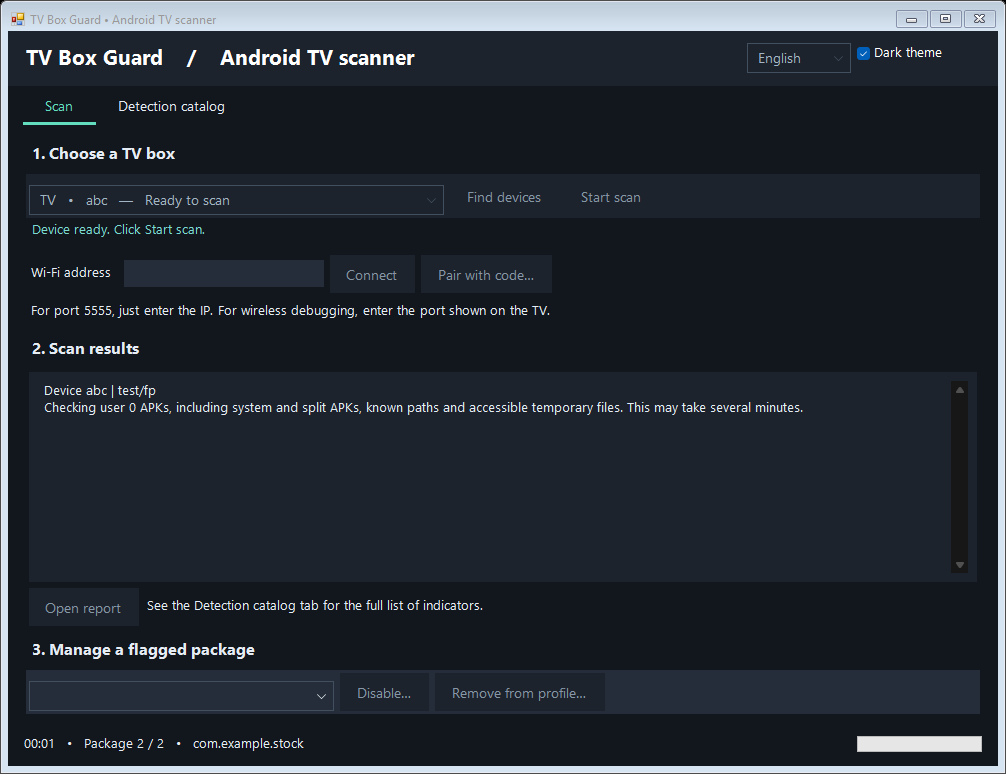
TV Box Guard window during a scan

03 / VIRUSTOTAL

Why VirusTotal shows warnings

On 4 November 2026, 6 of 64 VirusTotal engines flagged the TV Box Guard 1.0.4 Windows executable. Based on our checks, we believe these are false positives. For example, SentinelOne’s “Static AI - Suspicious PE” means its model found characteristics of the file suspicious. The label does not identify a specific virus.

Open the current VirusTotal report ↗

What we checked

When you start device discovery, Guard looks for devices on your local network using Android Debug Bridge (ADB). We compared the embedded adb.exe and its three libraries with Google’s Android SDK Platform-Tools. All four files match byte for byte. Guard itself has no Windows code-signing signature. We do not know which file characteristics influenced each engine’s verdict.

What we sent for review

We submitted review requests covering all six detections. We included the build’s SHA-256, the detection labels, links to the EXE and the VirusTotal report, and an explanation of how Guard uses ADB. Elastic registered the request. Our first email to SentinelOne was rejected, and we asked for another way to submit the sample. We do not yet have confirmation that all six warnings have been cleared.

To check that your download is the build we examined, compare its SHA-256 with the value below.